Creating Header and Footer Lines

| Contents | Search | Support | Jarte Home |
|
Creating Header and Footer Lines |
|
| Contents | Search | Support | Jarte Home |
|
General Page Margins Header & Footer
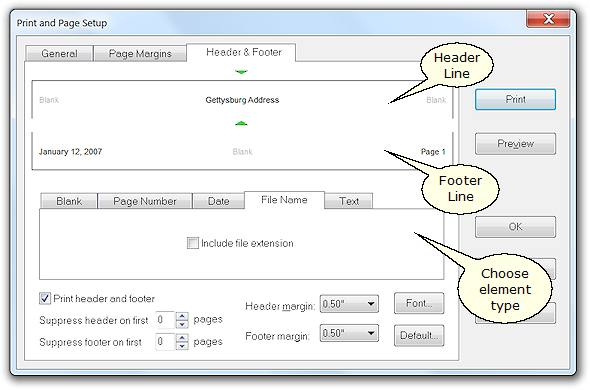
Jarte's header and footer designer allows the creation of header and footer lines that appear on the printed pages of a document. There are definable left side, middle, and right side elements in both the header and footer lines. Each element defaults to being blank. An element can be changed by selecting it with the mouse and then using the element type tabs to define the element as desired. Header and Footer Element Types Blank This is the default element type. Blank header and footer elements simply appear as empty white space in the header and footer lines. Page Number Prints the appropriate page number for each page of the document. Use Roman numerals: Determines whether the page numbers are printed as lower case Roman numerals rather than the standard Arabic numerals. Roman numeral numbering is limited to 50 pages (Arabic page numbering is unlimited). This setting is only available in Jarte Plus. Use "Page" prefix: Determines whether the word "Page" is prefixed to each page number. Otherwise, just the page number itself is printed. p: This button allows the word "Page", used in setting Use "Page" prefix, to be redefined. This is useful when printing non-English documents where the word "Page" needs to be replaced by its non-English equivalent. Date Prints a date. If a static date is desired then the "Text" element should be used instead. Use current date: The date used is the date the document is printed. Use file date: The date used is the date the document was last modified. Long format: The date is printed using the long date format typically used in your locale (e.g., "January 30, 2007" in the United States). Short format: The date is printed using the short date format typically used in your locale (e.g., "1/30/2007" in the United States). File Name Prints the document's file name. Include file extension: Determines whether the document's file name extension is printed as part of the file name (e.g., "Gettysburg Address.rtf" as opposed to "Gettysburg Address"). Text Prints any user defined text. Header and Footer Controls Print header and footer: Controls whether the header and footer lines defined for the document are actually printed in the document's printouts. Suppress header on first Page: Prevents the header line from being printed on the first page of the document's printout. Suppress footer on first Page: Prevents the footer line from being printed on the first page of the document's printout. Header Margin: Controls the distance between the top of the page and the header line. Footer margin: Controls the distance between the bottom of the page and the footer line. Font: Controls the font attributes used to print the header and footer lines. Default: Saves the currently defined header and footer lines as the default to be used for all new documents. |

 Carolina Road Software
Copyright © 2001-2007 Carolina Road Software L.L.C. All rights reserved.