Inserting Hyperlinks

| Contents | Search | Support | Jarte Home |
|
Inserting Hyperlinks |
|
| Contents | Search | Support | Jarte Home |
|
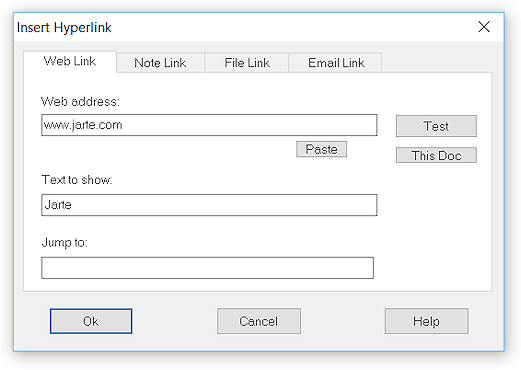
Insert Hyperlink inserts clickable text that contains one of three available hyperlink types. Hovering the mouse over hyperlinked text causes the hyperlink's URL (i.e., the hyperlink's destination address) to be displayed. A hyperlink is activated by clicking it while pressing the Ctrl key, or by pressing the Enter key while the text cursor is positioned in the hyperlink. This behavior can be modified via advanced setting Simple Hyperlink Clicks. Note: In versions of Windows previous to Windows 8 hyperlinks can only be applied to text. In Windows 8 and above hyperlinks can be applied to images as well. Note: In Windows 8 and above the shade of blue used to color hyperlink text can be controlled via advanced setting Light Blue Links. Jarte provides a choice of three different hyperlink types: Web Hyperlink
A web hyperlink contains a URL to a web page. Clicking the hyperlink while pressing the Ctrl key opens the web page in your web browser. Note Hyperlink
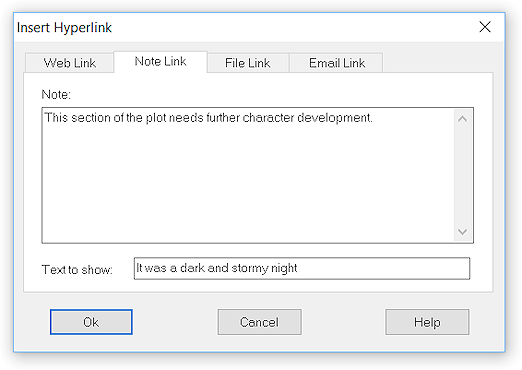
A note hyperlink contains a user provided note that appears when the mouse hovers over the link, or if the user performs a Ctrl+click on the link. Note hyperlinks provide a means of attaching free form notes to selected text in a document. When a note hyperlink created by Jarte is activated while being viewed in a different word processor, such as WordPad, the reader is taken to a web page that displays the content of the note. File Hyperlink
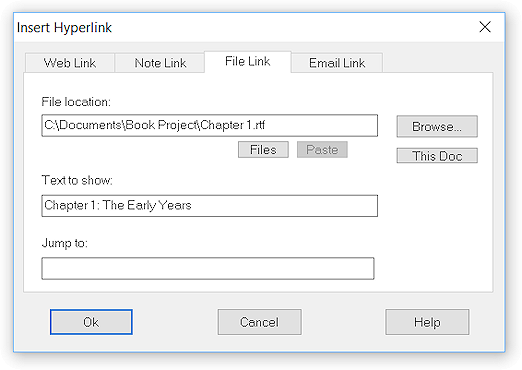
A file hyperlink contains a path to a file located on your computer. Clicking the hyperlink while pressing the Ctrl key causes different behavior depending the type of file pointed to by the hyperlink. The possible behaviors are described in the following table:
Jump to is optional text used to indicate a position within the hyperlinked document file. When the document is opened via the hyperlink Jarte will automatically scroll down to the first occurrence of the text specified by Jump to. Note that special terms {cr} and {tab} can be used to represent carriage returns and tabs in the Jump to text. Also note that "Jump to" is exclusive to Jarte Plus. The This Doc button is used to indicate the file hyperlink is to point to the same document file that contains the hyperlink. This is useful when used with Jump to as a means of instantly jumping to another location within the same document. Note: Hyperlinks that use the Jump to feature are not supported by word processors other than Jarte. The Files button makes it easy to specify the file path of a currently open file or a recently opened file via a selection menu. Relative Paths The file path used for the hyperlink can be either a fully qualified file path (i.e., a file path that begins with a drive letter) or a relative file path. Relative paths are always with respect to the location of the file containing the file hyperlink. For example, if files A and B reside in the same folder then a file hyperlink pointing to file B can be added to file A simply by specifying B's file name in the hyperlink (e.g., "My Report - B.rtf"). Portable File Hyperlinks Note that if Jarte is running from a portable drive, and a file hyperlink pointing to a file on the same portable drive is added to a document, then that hyperlink will continue to work properly even if the portable drive's drive letter has changed in a later editing session. This ensures file hyperlinks work reliably even when Jarte is used as a portable word processor on different computers. However, portable file hyperlinks are not recognized by other word processors. If desired, advanced setting Use Portable File Links can be used to direct Jarte to instead use non-portable file hyperlinks which are usable in other word processors. E-mail Hyperlink
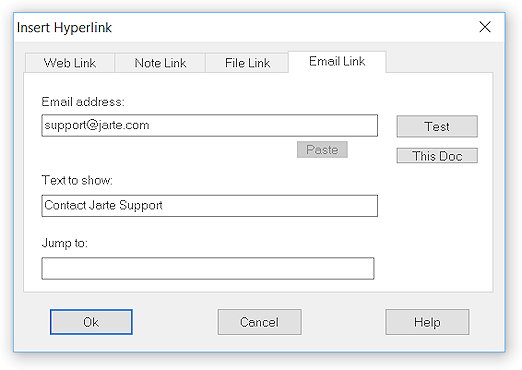
An e-mail hyperlink contains an e-mail address. Clicking the hyperlink while pressing the Ctrl key opens a new, empty e-mail window addressed to the specified recipient. |

 Carolina Road Software
Copyright © 2001-2018 Carolina Road Software L.L.C. All rights reserved.