Creating Outlines

| Contents | Search | Support | Jarte Home |
|
Creating Outlines |
|
| Contents | Search | Support | Jarte Home |
|
Auto Outline
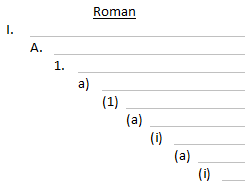
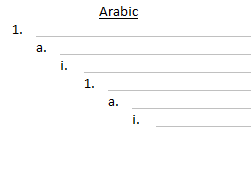
Auto Outline is an exclusive Jarte Plus feature that allows you to create perfect outlines with minimal effort. Jarte automatically maintains proper outline numbering for outline entries (i.e., paragraphs) when the Auto Outline feature is activated. Both Roman and Arabic outline numbering schemes are available, as shown here:
Outline numbering is based on the indentation level of the outline's entries. Use Jarte's Increase Indent and Decrease Indent features to change an outline entry's outline level. The outline level can also be changed using the Tab and Backspace (or Shift + Tab) keys if the text cursor is placed at the beginning of an outline entry. Auto Outline maintains proper outline numbering throughout your outline as you add and delete entries anywhere within the outline. Proper outline numbering is also maintained as you change the outline level of existing entries anywhere within the outline. An outline can be ended by pressing the Enter key twice. Tip: Auto outlines default to the Roman numbering scheme by default. The default can be changed to Arabic numbering by changing advanced setting Default to Arabic Outline. Note: Outlines created while Jarte is running on Windows 8 and above are not handled as auto outlines if edited later while Jarte is running on Windows 7 or below. This is because Microsoft introduced a new version of the WordPad word processing engine Jarte is based on in Windows 8, and the new engine handles outlines differently than earlier versions of the engine. Unnumbered Outline Paragraphs
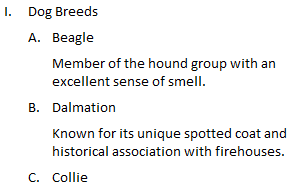
Occasionally, it may be necessary to split a single outline entry into more than one paragraph. Only the first paragraph of the outline entry should be numbered in this case. For example:
Notice the two unnumbered paragraphs in the outline do not interrupt or upset the outline's numbering. This effect is achieved by applying the Unnumbered Paragraph setting to the desired paragraphs. An unnumbered paragraph can also be created by simply pressing Shift+Enter. |

 Carolina Road Software
Copyright © 2001-2014 Carolina Road Software L.L.C. All rights reserved.